How to investigate an AI agent session in Marshy
Find a classified agent session in Marshy, inspect the journey and verdict timing, check account association, and confirm the backend outcome.
Dev Shah4 min read
Investigate an AI agent session in Marshy by finding the relevant visit, opening its details, comparing the verdict moment with the Journey timeline, checking account association, and confirming the task outcome in backend records. Record observed facts and remaining unknowns before choosing a response.
This walkthrough follows the current interface. Its screenshot uses explicitly labeled generated demo data so you can see the workflow without implying a live customer incident.
1. Check that the right project is collecting
Open the project settings and review the installation steps: paste the snippet in the page head, deploy the change, and confirm a first visit is received. Use your Marshy integration's snippet so the project key and endpoint match the environment you are investigating.
If you are debugging staging activity, keep it distinguishable from production traffic. Note the URL, approximate time, and harmless task you performed. A visit without a verdict may still be useful for diagnosing collection coverage.
For an App Router application, follow the Next.js installation tutorial.
2. Narrow the session list
Open Sessions. Select the relevant project when multiple projects are available, choose a time range, and filter by verdict where appropriate. Start with the time of the task rather than browsing a broad agent cohort and guessing which visit is yours.
Keep the uncertain results accessible. Marshy distinguishes human, agent, review-related, and undecided presentation states. A review case may need investigation even if your current operational policy lets it continue.
Click a matching row to open its session details. Record the session identifier before joining it to an external report; display order or an account name is not a stable correlation key.
3. Read the verdict alongside the journey
The session drawer shows its classification, confidence presentation, kind, and summary information such as length, pages, active time, and tabs. Use these as observations about the instrumented visit.
The Journey view places pages and the verdict moment in a timeline. Find the consequential task and check whether the classification arrived before or after that task. This timing matters when evaluating a policy that would have used the verdict.
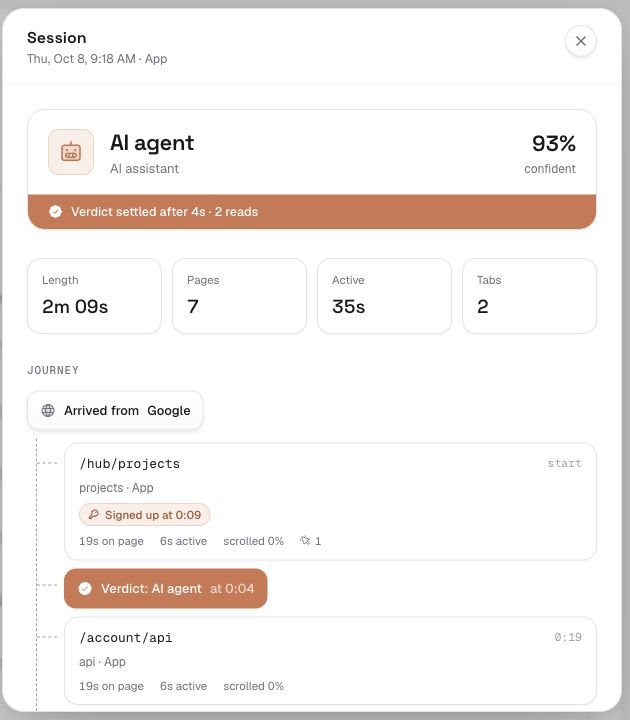
Marshy demo mode with generated sample data. The classification, confidence, and timing shown here are fictional UI examples, not live detection or customer results.
| Observation | Useful question | Avoid concluding |
|---|---|---|
| Agent classification | What automation evidence or kind is available? | Which model ran it without attribution evidence |
| Review or undecided | Was the session long enough and instrumented? | That the visitor must be human |
| Several pages or tabs | What task could explain the sequence? | That activity alone proves abuse |
| Verdict arrives late | Could the proposed policy have acted in time? | That an earlier decision used a later signal |
Do not treat confidence as a provider-identity certificate. Keep your investigation tied to the task and the evidence available for that session.
4. Check account association
The Signed in as area and visitor history help establish account context when identification is configured. A server-verified association is stronger evidence of account attribution than an unsigned browser-supplied identifier.
Account attribution still does not determine who currently controls the interface. A customer may hand a task to an assistant or take it back midway. Record that possibility rather than making the account's entire history a single operator label.
Use authentication and backend permission records to determine which actions were authorized. An agent verdict cannot make an export legitimate or illegitimate on its own.
5. Confirm the outcome outside the browser
Review device and network context when it helps explain the journey, but do not assign a provider from a shared network or familiar browser string alone.
Find the server operation associated with the task. Was an export produced, a job created, or a duplicate request rejected? A timeline click is not proof of completion. Correlate using the minimum identifiers your architecture requires.
Write the investigation in three parts: observed facts, remaining unknowns, and proposed action. An example is “classified agent session attempted the export; server denied missing permission; provider unknown.” That is more defensible than assigning a brand based on the task description.
6. Decide the next experiment
If collection is incomplete, fix instrumentation before interpreting the cohort. If the workflow creates cost or unwanted access, evaluate an action-specific policy in observation mode. If a legitimate assistant task fails, test labels, errors, authorization, and handoff behavior.
Use the evaluation template to preserve evidence, and the traffic report template to communicate the denominator. Open Marshy to investigate a session from your own project.
Interface checked October 8, 2026 against the local Marshy implementation. This is a workflow guide, not a case study or claim about a live customer incident.